
Register at WINLAH: Create & Verify Your Account Easily
WINLAH register provides a simple registration process, allowing users to create an account and quickly access every feature of WINLAH. By preparing the required information and following the instructions step by step, you can complete the WINLAH register process without spending much time.
Step-by-step WINLAH register guide
To complete WINLAH register smoothly, prepare all the necessary information before getting started. The steps below can help you create an account easily and avoid common mistakes.
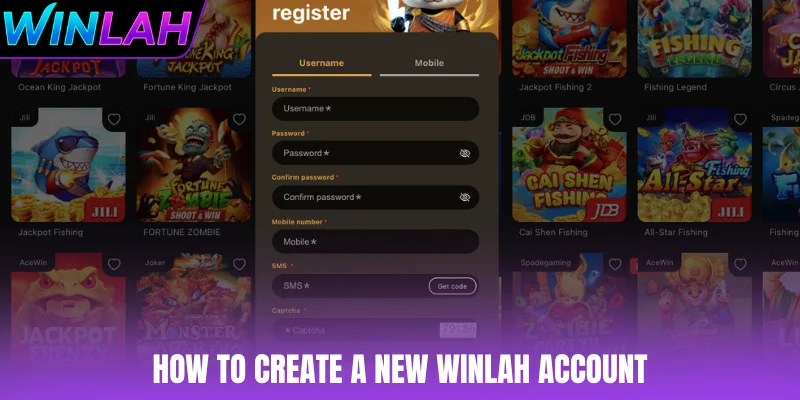
Quick registration with a username
To sign up for WINLAH, you need to prepare your personal phone number and the required login details. Enter each field accurately, review the information and confirm to complete the registration.
- Enter your Username, Password and Confirm Password.
- Input your Mobile Number (+60) and your Email address.
- Click Get Code to receive an OTP by SMS or email, then enter the code in the verification field.
- Enter the correct Captcha code, then click Register to complete the process. If you already have an account, click Login to access it.
Verify your WINLAH account with OTP
WINLAH register uses a one-time password (OTP) to confirm that the phone number or email belongs to you. Each player may hold only one account.
- Make sure the Mobile Number and Email you entered are active and belong to you.
- Click Get Code, receive the OTP by SMS or email and enter it before it expires.
- If the code does not arrive, wait a moment and request a new one instead of creating a second account.
- Enter the Captcha code displayed on the screen and click Register. You must be 21 or older to register.
Required Information for WINLAH register
Before completing register, you should prepare all the necessary information to make the registration process smoother. Each field serves a specific purpose, so review your details carefully before submitting them to avoid having to enter the information again.

| Field | What it is for |
|---|---|
| Username | The unique name used to access your account; it must meet the applicable requirements and cannot already be in use. |
| Password & Confirm Password | Protects your account; re-entering it in the confirmation field makes sure both entries match. |
| Mobile Number (+60) | The phone number you currently use to receive OTP codes and verify your account. |
| An active email address that can receive OTP codes and account notices. | |
| SMS OTP | The verification code sent by SMS to the number you entered; type it exactly as received. |
| Captcha | The code or image shown on screen that completes the security check before registration. |
WINLAH account setup guide for beginners
Setting up your account information immediately after registration is an important step for improving account security and accessing available account features. New register users can complete their profiles by following the basic setup steps below.
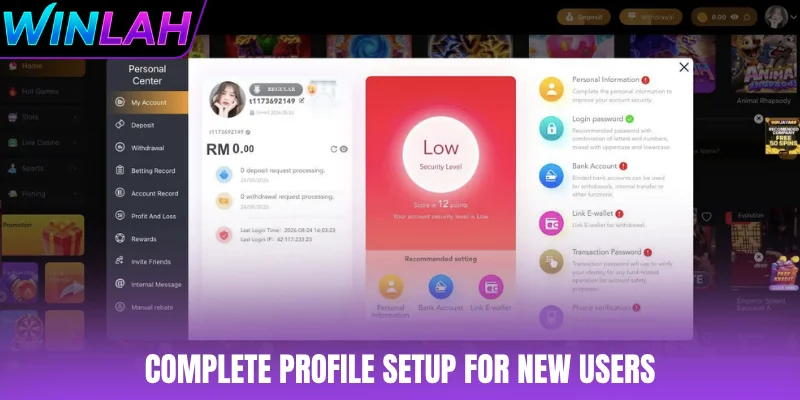
Guide to updating your personal information
Updating your personal information after WINLAH register helps keep your account details complete and reduces potential verification issues. Review each field carefully before saving, especially information related to withdrawals. Details about personal-data handling appear in the WINLAH privacy policy.
- Enter the Withdrawer Name so that it matches the name on your bank account, then set your preferred Nickname.
- Link your Google account or enter your personal Email to add a verification method and receive notifications.
- Check the +60 country code, enter the correct Phone Number, and review your information before completing the setup.
WINLAH register withdrawal account guide
Adding a bank account allows you to prepare the necessary information for using withdrawal features. After completing register, carefully check your banking details and account holder name before submitting them.
- Select Select Bank and enter the Name on Card so that it matches your bank account information.
- Enter your Account Number, then set a Transaction Password and re-enter it under Confirm Password.
- Review all the information and click Submit to complete the linking process. The Registered Withdrawal Accounts section displays the linked accounts.
Linking an e-wallet after registration
Linking an e-wallet can make it more convenient to manage your payment methods after completing WINLAH register. When setting it up, make sure the wallet details and account information are entered accurately to reduce potential errors during use.
- Select E-wallet and enter the Name on Card so that it matches the name registered with the wallet.
- Select an E-wallet Type, such as Touch ’n Go, Boost, GrabPay or ShopeePay, then enter the required information under Please Fill in Account Numbers.
- Enter your Transaction Password and Confirm Password, review the details and submit the request to complete the linking process.
Next steps after signing up for WINLAH
After completing register, you can review the following steps to prepare your account before using the platform. Completing the necessary information and settings can make future access more convenient.
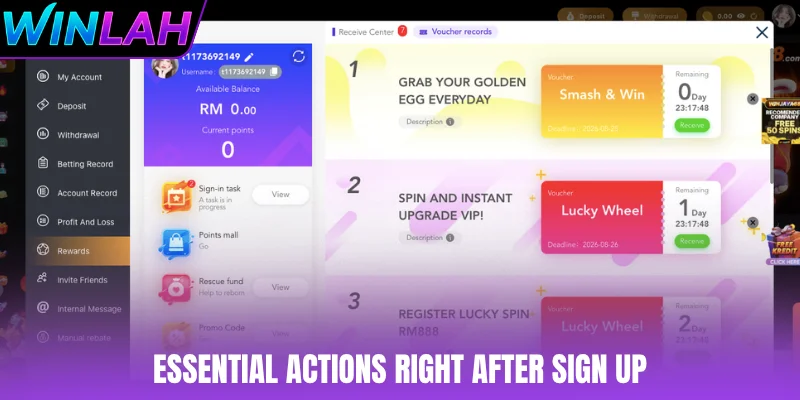
- Make your first deposit: Check the available payment methods and choose the option that suits you.
- Check promotions: Review the available offers and their applicable terms before participating.
- Download the mobile app: Use the official application, if available, for more convenient account access.
- Explore the game selection: Browse various options, including hot games, slots, live casino, sports betting and fishing games.
WINLAH register questions
What do I need to register at WINLAH?
A username, a password, your mobile number and an email address. An OTP is sent by SMS or email to verify the account.
How old do I need to be to join WINLAH?
You must be 21 or older to register and play.
Can I open more than one WINLAH account?
No. Each player may hold one account. Duplicate accounts can lose bonuses and be restricted.
Conclusion
WINLAH register allows users to create an account and set up the necessary information to access the platform. From entering personal details and verifying your phone number to linking payment methods, carefully reviewing each field can help minimize errors. The steps above can make the registration process more straightforward while helping you manage your account more conveniently.